AI captions made for modern creators

Turn every reel into captions in seconds.

Upload your video, generate accurate captions, style every word, and export a post-ready reel in minutes.

★★★★★

Built with creators, for creators

Before vs After

See what KlipifyAI changes

The same reel, transformed with readable captions, stronger visual hierarchy, and a presentation designed to hold attention.

Without KlipifyAI
Raw reel
Easy to skipMessage is missed without sound
K
KlipifyAI
With KlipifyAI
Captioned reel
Built to stop the scrollReadable, styled and ready to post

Turn every reel into content people can't skip.

Review the workflow

Record. Klipify. Publish.

A simple workflow you will understand on your first project.

01

Upload

Open the app and confirm that your source file, duration, and language are supported before starting a full project.

CheckFile type
CheckDuration limit
02

AI Edit

Use a representative clip and review the result for names, punctuation, timing, line breaks, and mixed-language text.

CheckLanguages
ReviewTranscript + timing
03

Publish

Confirm the available output, resolution, watermark rules, and plan access in the app before publishing.

CheckOutput format
CheckPlan access
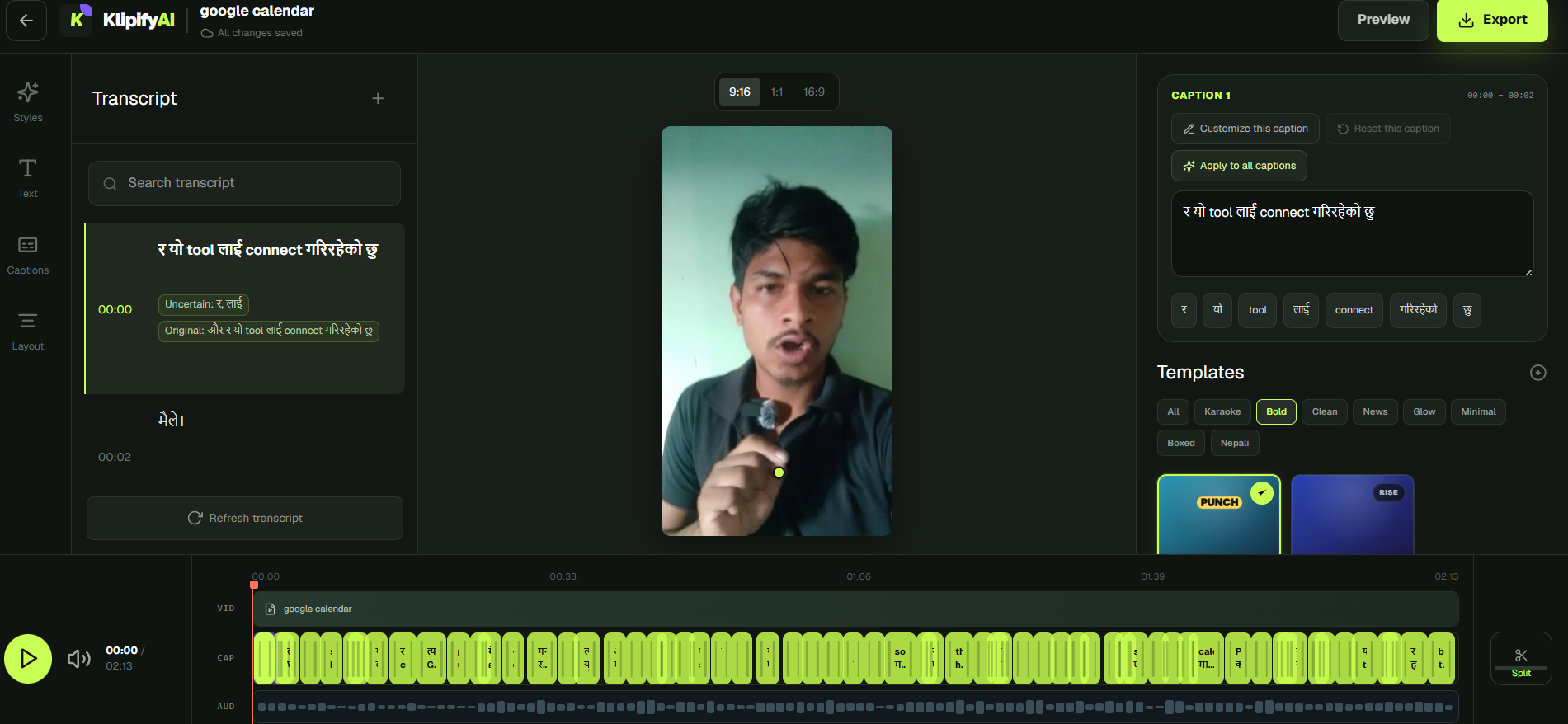
Inside the studio

Everything you need to finish the video.

Review the transcript, adjust captions, pick a style and export — all in one focused workspace.

KlipifyAI Studio showing the transcript, vertical video preview, caption controls, templates and editing timeline
Actual KlipifyAI Studio
Test before committing

What to check in a caption workflow

Use the same representative clip to check the current product before starting a full project.

What to inspectHow to verify
TranscriptNames, numbers, punctuation, and difficult phrasesCompare the generated text with the source audio
TimingCaption changes and readable line lengthsWatch the full test clip at normal speed
LanguagesScript rendering and code-switchingUse the same language mix found in real projects
EditingCorrection effort and available controlsMake real corrections inside the current app
OutputRequired file, resolution, and watermark rulesConfirm availability on the intended plan
CostAllowance, eligibility, and payment termsCheck the final plan request before activation
Simple, transparent pricing

Pay for what you need.

Start with the essentials. Upgrade when you need more caption minutes, polished exports, stronger brand control, or team-ready workflows.

Billing period

PUBLISHED NEPAL PLAN

Free

Checking the current product workflow

Free

5 lifetime transcription minutes

Confirm before activationApp verification required
  • 5 lifetime transcription minutes
  • Current feature access confirmed in the app
  • Final eligibility and payment terms confirmed before activation
Start Free

PUBLISHED NEPAL PLAN

Starter

A published entry plan for Nepal users

NPR 500/ mo

60 transcription minutes per month

Confirm before activationApp verification required
  • 60 published transcription minutes per month
  • Current feature access confirmed in the app
  • Final eligibility and payment terms confirmed before activation
Choose Starter Plan
Most popular creator planBest balance of minutes, speed and professional exports
Best value

PUBLISHED CREATOR PLAN

Creator

A published higher-minute plan for Nepal users

NPR 750/ mo
Best value
120 transcription minutes per monthFresh caption capacity every billing cycle
Confirm before activationApp verification required
  • 120 published transcription minutes per month
  • Current feature access confirmed in the app
  • Final eligibility and payment terms confirmed before activation
Choose Creator Plan

PUBLISHED NEPAL PLAN

Team

A published higher-volume plan for Nepal users

NPR 1,500/ mo

300 transcription minutes per month

Confirm before activationApp verification required
  • 300 published transcription minutes per month
  • Current feature access confirmed in the app
  • Final eligibility and payment terms confirmed before activation
Choose Team Plan

Need a complete comparison? View all plan details

Built around your workflow

Made for every kind of creator.

Whether you publish daily reels, educational videos, or content for multiple clients, KlipifyAI helps you caption, style, and prepare every video faster.

Content Creators

Turn raw recordings into polished, captioned content without spending hours manually editing every word.

  • Create captions for Reels, Shorts, and TikTok
  • Save personal fonts, colors, and styles
  • Work with English, Nepali, Hindi, and mixed-language videos
  • Export videos ready for publishing
Reel edit Captions ready
9:16

Turn one idea into three strong clips.

Bold Pop

Style · High contrast

InstagramTikTokYouTube Shorts
InstagramTikTokYouTube ShortsReels
Explore KlipifyAI tools

Start with the workflow you need.

Practical guides for creating, reviewing, and styling captions across languages and social video formats.

014

Nepali Caption Generator

Review the workflow and confirm current availability.

017

Instagram Caption Generator

Review the workflow and confirm current availability.

013

Reel Subtitle Generator

Review the workflow and confirm current availability.

022

YouTube Shorts Caption Generator

Review the workflow and confirm current availability.

015

Nepali Subtitle Generator

Review the workflow and confirm current availability.

017

Captions for Content Creators

Review the workflow and confirm current availability.

Your clip is the best test

Start free with a video you already know.

Use a short clip with real names, background noise, and the language mix you publish. Review the result before moving a full project.

Available now

Your next reel should not take all day.

Start with the full KlipifyAI workflow. No complicated setup and no credit card needed.

Start creating
Free during beta